1 2 3 4 5 6 7 8 9 10 11 12 13 14 15 16 17 18 | public static Vector< Class< ?>> getAllLoadedClasses( ClassLoader classLoader) throws SecurityException, NoSuchFieldException, IllegalArgumentException, IllegalAccessException { Field f = ClassLoader.class.getDeclaredField( "classes"); f.setAccessible( true); return ( Vector< Class< ?>>)f.get( classLoader); } public static void main( String[] args) throws Exception { DorbaeDateUtil.getCurrentDate(); DorbaeByteUtil.dos2Unix( "%n".getBytes()); java.util.List< Class< ?>> clss = DorbaeClassLoaderUtil.findInheritedClasses( Thread.currentThread().getContextClassLoader(), Object.class); for ( int ll = 0; ll < clss.size(); ll++) { System.out.println( clss.get( ll).getName()); } } |
Thursday, 16 June 2016
[Java] How to get all loaded classes in ClassLoader (클래스로더에 올라간 모든 Class 가져오기)
[JDBC] How to find classes implemented java.sql.Drvier in JDBC Driver jar file.(JDBC 드라이버 Jar 파일에서 Drvier Class 찾기)
1 2 3 4 5 6 7 8 9 10 11 12 13 14 15 16 17 18 19 20 21 22 23 24 25 26 27 28 29 30 31 32 33 34 35 36 37 38 39 40 41 42 43 44 45 46 47 | public static java.util.List< String> findDriverClassNamesInJars( java.io.File[] jarFiles) throws FileNotFoundException, IOException { java.util.jar.JarInputStream jarFileInputStream = null; java.util.jar.JarEntry jarEntry = null; java.net.URLClassLoader ucl = null; java.net.URL url = null; ClassLoader classLoader = Thread.currentThread().getContextClassLoader(); Class< ?> baseInClass = java.sql.Driver.class; java.util.List< String> classNames = new java.util.ArrayList< String>(); for ( int ll = 0; ll < jarFiles.length; ll++) { url = new java.net.URL( "jar:file:" + jarFiles[ ll] + "!/"); ucl = new URLClassLoader( new java.net.URL[] { url }, classLoader); try { jarFileInputStream = new java.util.jar.JarInputStream( new java.io.FileInputStream( jarFiles[ ll])); while ( ( jarEntry = jarFileInputStream.getNextJarEntry()) != null) { if ( jarEntry.getName().endsWith( ".class")) { String classname = jarEntry.getName().replaceAll( "/", "\\."); classname = classname.substring( 0, classname.length() - 6); if ( !classname.contains( "$")) { try { final Class< ?> myLoadedClass = Class.forName( classname, true, ucl); if ( baseInClass.isAssignableFrom( myLoadedClass)) { classNames.add( myLoadedClass.getName()); } } catch ( Exception e) { continue; } catch ( Error e) { continue; } } } } } finally { try { jarFileInputStream.close(); } catch ( Exception e) {} } } return classNames; } |
Friday, 10 June 2016
[Maria/MySQL] Illegal mix of collations for operation '=' Error Troubleshooting
I met Illegal mix of collations for operation '=' exception when executing join select query.
It is because of this that difference of collation table or column.


It is related with character type columns like VARCHAR, CHAR, and so on.

It is because of this that difference of collation table or column.
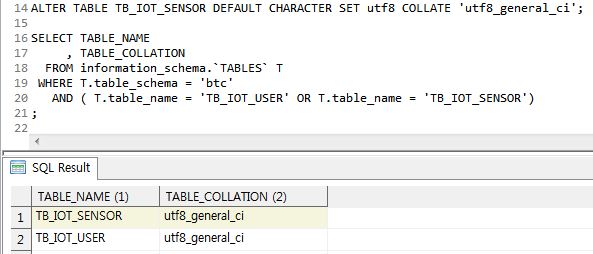
1. Check Table Collation
SELECT TABLE_NAME , TABLE_COLLATION FROM information_schema.`TABLES` T WHERE T.table_schema = '<DB_NAME>' AND T.table_name = '<TABLE_NAME>' ;
2. Change Table Collation
ALTER TABLE <DB_NAME>.<TABLE_NAME> DEFAULT CHARACTER SET utf8 COLLATE 'utf8_general_ci';
3. Check Column Collation
SELECT TABLE_NAME , COLUMN_NAME , DATA_TYPE , COLLATION_NAME FROM information_schema.`COLUMNS` WHERE TABLE_SCHEMA = '<DB_NAME>' AND TABLE_NAME = '<TABLE_NAME>' ;
It is related with character type columns like VARCHAR, CHAR, and so on.
4. Change column collation
ALTER TABLE <DB_NAME>.<TABLE_NAME> modify <COLUMN_NAME> <DATA_TYPE> CHARACTER SET utf8 COLLATE utf8_general_ci;
Wednesday, 8 June 2016
[Maria/MySQL] How to convert string to date
MariaDB(MySQL) has STR_TO_DATE function like TO_DATE in ORACLE.
ex)
ex)
SELECT STR_TO_DATE('2013-02-11', '%Y-%m-%d');
| Format | Description |
| %a | Abbreviated weekday name (Sun..Sat) |
| %b | Abbreviated month name (Jan..Dec) |
| %c | Month, numeric (0..12) |
| %D | Day of the month with English suffix (0th, 1st, 2nd, 3rd, …) |
| %d | Day of the month, numeric (00..31) |
| %e | Day of the month, numeric (0..31) |
| %f | Microseconds (000000..999999) |
| %H | Hour (00..23) |
| %h | Hour (01..12) |
| %I | Hour (01..12) |
| %i | Minutes, numeric (00..59) |
| %j | Day of year (001..366) |
| %k | Hour (0..23) |
| %l | Hour (1..12) |
| %M | Month name (January..December) |
| %m | Month, numeric (00..12) |
| %p | AM or PM |
| %r | Time, 12-hour (hh:mm:ss followed by AM or PM) |
| %S | Seconds (00..59) |
| %s | Seconds (00..59) |
| %T | Time, 24-hour (hh:mm:ss) |
| %U | Week (00..53), where Sunday is the first day of the week; WEEK() mode 0 |
| %u | Week (00..53), where Monday is the first day of the week; WEEK() mode 1 |
| %V | Week (01..53), where Sunday is the first day of the week; WEEK() mode 2; used with %X |
| %v | Week (01..53), where Monday is the first day of the week; WEEK() mode 3; used with %x |
| %W | Weekday name (Sunday..Saturday) |
| %w | Day of the week (0=Sunday..6=Saturday) |
| %X | Year for the week where Sunday is the first day of the week, numeric, four digits; used with %V |
| %x | Year for the week, where Monday is the first day of the week, numeric, four digits; used with %v |
| %Y | Year, numeric, four digits |
| %y | Year, numeric (two digits) |
| %% | A literal “%” character |
| %x | x, for any “x” not listed above |
Labels:
convert,
date,
dbms,
dbms.maria,
dbms.mysql,
maria,
mysql,
to_date
Tuesday, 7 June 2016
[Maria/MySQL] How to get database charset (캐릭터셋 확인)
Labels:
charset,
database,
db,
dbms,
dbms.maria,
dbms.mysql,
maria,
mysql
Friday, 3 June 2016
[Maria/MySQL] Upsert(Merge) Statement
1. Insert ignoring duplication
ignore duplication row(s). skip duplicate data and insert only non-duplicate data.INSERT IGNORE INTO <SOURCE_TABLE> VALUES (VALUE1, VALUE2...); INSERT IGNORE INTO <SOURCE_TABLE> SELECT * FROM <TARGET_TABLE>;
2. Inserting new rows and updating existing rows
2.1. Using Standard SQL(OuterJoin)
It needs two-step process (insert and update). The benefit to this approach is standards compliance. But it is poor efficiency.INSERT INTO <SOURCE_TABLE> (KEY_COL1, COL2, COL3) SELECT T.COL1, T.COL2, T.COL3 FROM <TARGET_TABLE> T WHERE LEFT OUTER JOIN <SOURCE_TABLE> AS S ON T.KEY_COL1 = S.KEY_COL1 WHERE S.KEY_COL1 IS NULL
;
UPDATE <TARGET_TABLE> AS T
INNER JOIN <SOURCE_TABLE> AS S ON T.KEY_COL1 = S.KEY_COL1 SET T.COL2 = S.COL2
, T.COL3 = S.COL3 ;
2.2. Using Standard SQL(OuterJoin)
This is far more efficient, but it still might be very bad. It could lock the tables for a long time with large datasets, and like all two-step processes, it is not transactional.INSERT INTO <TARGET_TABLE> (KEY_COL1, COL2, COL3) SELECT S.COL1, S.COL2, S.COL3 FROM <SOURCE_TABLE> S WHERE LEFT OUTER JOIN <SOURCE_TABLE> AS S ON S.KEY_COL1 = T.KEY_COL1 WHERE T.KEY_COL1 IS NULL; UPDATE <TARGET_TABLE> AS T INNER JOIN <SOURCE_TABLE> AS S ON T.KEY_COL1 = S.KEY_COL1 SET T.COL2 = S.COL2 , T.COL3 = S.COL3 ; UPDATE <TARGET_TABLE> AS T INNER JOIN <SOURCE_TABLE> AS S ON T.KEY_COL1 = S.KEY_COL1 SET T.COL2 = S.COL2 , T.COL3 = S.COL3 ; INSERT INTO <TARGETTABLE> (KEY_COL1, COL2, COL3) SELECT S.KEY_COL1, S.COL2, S.COL3 FROM <SOURCE_TABLE> AS S LEFT OUTER JOIN <TARGET_TABLE> AS T ON S.KEY_COL1 = T.KEY_COL1 WHERE T.KEY_COL1 IS NULL ;
2.3. Using Non-standard ON DUPLICATE KEY UPDATE Statement
Recommend this way.INSERT INTO <TARGET_TABLE> ( KEY_COL1, COL2, COL3) SELECT KEY_COL1, COL2, COL3 FROM <SOURCE_TABLE> ON DUPLICATE KEY UPDATE COL2 = <VALUE2> , COL3 = <VALUE3> ;
Labels:
dbms,
dbms.maria,
dbms.mysql,
duplicate,
maria,
merge,
upsert
Tuesday, 31 May 2016
[Xen] Export snapshot to file shell script
1. Check Snapshot name
2. Run shell script
exportSnapshot.sh
1 2 3 4 5 6 7 8 9 10 11 12 13 14 15 16 17 18 19 20 21 22 23 24 25 26 27 28 29 30 31 32 33 34 35 36 37 38 39 40 41 42 43 44 45 46 47 | #!/bin/sh ######################################################### # # Export Xen Snapshot to File # ######################################################### # Created by : dorbae # Created Date : 2016-05-31 # Last Update : 2016-05-31 # Version : 1.0.0 ######################################################### # # * History # # 1.0.0 Initialize # ######################################################### if [ "$#" -ne 1 ]; then echo "Usage: $0 [SNAPSHOT_NAME]" exit 1 fi SNAPNAME=$1 DATE=`date +%Y%m%d` TIMESTAMP=`date +%Y-%m-%d' '%T` mkdir -p ~/xenBackup LOGFILE=~/xenBackup/log/${SNAPNAME}.log PIDFILE=~/xenBackup/${SNAPNAME}.pid BACKUPDIR=/bak echo $$ > $PIDFILE echo "[INFO ] `date +%Y-%m-%d' '%T`: Export Snapshot Start...[PID=$$]" >> $LOGFILE SNAPUUID=`xe snapshot-list | grep -B 1 ${SNAPNAME} | grep uuid | cut -d":" -f2 | sed 's/^ *//g'` echo "[INFO ] `date +%Y-%m-%d' '%T`: SNAPUUID=$SNAPUUID" >> $LOGFILE echo "[INFO ] `date +%Y-%m-%d' '%T`: Exporting $SNAPNAME Start..." >> $LOGFILE BAKFILE=$BACKUPDIR/${SNAPNAME}.xva echo "[INFO ] `date +%Y-%m-%d' '%T`: BAKFILE=$BAKFILE" >> $LOGFILE xe vm-export vm=$SNAPUUID filename="$BAKFILE" echo "[INFO ] `date +%Y-%m-%d' '%T`: Exporting $SNAPNAME End..." >> $LOGFILE echo "[INFO ] `date +%Y-%m-%d' '%T`: Export End..." >> $LOGFILE exit 0 |
[Shell] How to check for the correct number of arguments
1 2 3 4 | if [ "$#" -ne 2 ]; then echo "Usage: $0 [IMAGE_NAME] [SNAP_UUID]" exit 1 fi |
[Maria/MySQL] How to install TokuDB storage engine and set it enabled.(TokuDB 스토리지 엔진 설치 및 사용방법)
TokuDB is available on the following distributions:
1. Installing TokuDB
TokuDB has been included with MariaDB since MariaDB 5.5.34 and MariaDB 10.0.6 and does not require separate installation.

I have 10.1.12 MariaDB. So don't not need to install tokudb engine package.


| Distribution | Introduced |
| CentOS 6 64-bit and newer | MariaDB 5.5.36 and MariaDB 10.0.9 |
| Debian 7 "wheezy"64-bit and newer | MariaDB 5.5.33 and MariaDB 10.0.5 |
| Fedora 19 64-bit and newer | MariaDB 5.5.33 and MariaDB 10.0.5 |
| openSUSE 13.1 64-bit and newer | MariaDB 5.5.41 and MariaDB 10.0.15 |
| Red Hat 6 64-bit and newer | MariaDB 5.5.36 and MariaDB 10.0.9 |
| Ubuntu 12.10 "quantal" 64-bit and newer | MariaDB 5.5.33 and MariaDB 10.0.5 |
1. Installing TokuDB
TokuDB has been included with MariaDB since MariaDB 5.5.34 and MariaDB 10.0.6 and does not require separate installation.
1.1. Installing TokuDB on Fedora, RedHat, & CentOS
# yum install MariaDB-tokudb-engine
1.2. Installing TokuDB on Ubuntu & Debian
# apt-get install mariadb-tokudb-engine-5.5
I have 10.1.12 MariaDB. So don't not need to install tokudb engine package.
2. Enabling TokuDB
2.1. Enabling TokuDB in configuration file
It is applied after starting or restarting.
# vi /etc/my.cnf.d/tokudb.cnf
[mariadb] # See https://mariadb.com/kb/en/how-to-enable-tokudb-in-mariadb/ # for instructions how to enable TokuDB # # See https://mariadb.com/kb/en/tokudb-differences/ for differences # between TokuDB in MariaDB and TokuDB from http://www.tokutek.com/ plugin-load-add=ha_tokudb.so
2.2. Enabling TokuDB when MariaDB is running
# mysqld --plugin-load=ha_tokudb --plugin-dir=<MariaDB Library Directory>/plugin
2.3. Enabling TokuDB manually from the mysql command line
# mysql -uroot -p
INSTALL SONAME 'ha_tokudb';
3. Create TokuDB Engine Table
CREATE TABLE TB_IOT_DHT_DATA ( MCU_NO int NOT NULL COMMENT 'MCU번호', SENSOR_NO int NOT NULL COMMENT '센서번호', SENSOR_DT datetime NOT NULL COMMENT '센서일시', SERVER_DT datetime COMMENT '서버일시', HUMI double COMMENT '습도', TEMP_C double COMMENT '섭씨온도', TEMP_F double COMMENT '화씨온도', LOC_LAT double COMMENT '위도', LOC_LON double COMMENT '경도', VOLTAGE int COMMENT '전압', PRIMARY KEY (MCU_NO, SENSOR_NO, SENSOR_DT) ) COMMENT = '온습도수집데이터', ENGINE = 'TokuDB';
Labels:
dbms,
dbms.maria,
dbms.mysql,
engine,
maria,
mysql,
storage,
toku,
tokudb
Wednesday, 11 May 2016
[Java] How to dump and analyze jvm heap memory using jmap, jhat (jmap, jhat을 이용한 JVM 힙메모리 덤프 및 분석)
JDK(Java Development Kit) has various java tools like javac, jps, jmap, jhat.
Sometimes, you want to analyze heap memory of running java process. For example, in case such as OutOfMemoryError.
If want to do that, you can use jmap and jhat java tools.
Sometimes, you want to analyze heap memory of running java process. For example, in case such as OutOfMemoryError.
If want to do that, you can use jmap and jhat java tools.
1. jmap
jmap prints shared object memory maps or heap memory details of a given process or core file or a remote debug server. If the given process is running on a 64-bit VM, you may need to specify the -J-d64 option.Usage: jmap [option] <pid> (to connect to running process) jmap [option] <executable <core> (to connect to a core file) jmap [option] [server_id@]<remote server IP or hostname> (to connect to remote debug server) where <option> is one of: <none> to print same info as Solaris pmap -heap to print java heap summary -histo[:live] to print histogram of java object heap; if the "live" suboption is specified, only count live objects -permstat to print permanent generation statistics -finalizerinfo to print information on objects awaiting finalization -dump:<dump-options> to dump java heap in hprof binary format dump-options: live dump only live objects; if not specified, all objects in the heap are dumped. format=b binary format file=<file> dump heap to <file> Example: jmap -dump:live,format=b,file=heap.bin <pid> -F force. Use with -dump:<dump-options> <pid> or -histo to force a heap dump or histogram when <pid> does not respond. The "live" suboption is not supported in this mode. -h | -help to print this help message -J<flag> to pass <flag> directly to the runtime system
2. jhat
The jhat command parses a java heap dump file and launches a web server. jhat enables you to browse heap dumps using your favorite web browser. jhat supports pre-designed queries (such as 'show all instances of a known class "Foo"') as well as OQL (Object Query Language) - a SQL-like query language to query heap dumps.C:\Users\Administrator>jhat ERROR: No arguments supplied Usage: jhat [-stack <bool>] [-refs <bool>] [-port <port>] [-baseline <file>] [-debug <int>] [-version] [-h|-help] <file> -J<flag> Pass <flag> directly to the runtime system. For example, -J-mx512m to use a maximum heap size of 512MB -stack false: Turn off tracking object allocation call stack. -refs false: Turn off tracking of references to objects -port <port>: Set the port for the HTTP server. Defaults to 7000 -exclude <file>: Specify a file that lists data members that should be excluded from the reachableFrom query. -baseline <file>: Specify a baseline object dump. Objects in both heap dumps with the same ID and same class will be marked as not being "new". -debug <int>: Set debug level. 0: No debug output 1: Debug hprof file parsing 2: Debug hprof file parsing, no server -version Report version number -h|-help Print this help and exit <file> The file to read For a dump file that contains multiple heap dumps, you may specify which dump in the file by appending "#<number>" to the file name, i.e. "foo.hprof#3". All boolean options default to "true"
3. Example
3.1. Check PID
C:\Users\Administrator>jps -ml 22160 sun.tools.jps.Jps -ml 26688 18736 BTCBrokerBridge.jar 40704 30532 6408 org/netbeans/Main --branding visualvm --cachedir C:\Users\Administrator\AppData\Local\VisualVM\Cache/7u14 --openid 5804750059758362 4204 com.sun.jme.toolkit.bootstrap.Container 19508 27316 35124 D:\activemq\apache-activemq-5.11.4\bin\../bin/activemq.jar start 40400
3.2. Dump Heap memory map
C:\Users\Administrator>jmap -dump:format=b,file=D:/activemq.dump 35124 Dumping heap to D:\activemq.dump ... Heap dump file created
3.3. Analyze Heap memory
C:\Users\Administrator>jhat D:/activemq.dump Reading from D:/activemq.dump... Dump file created Wed May 11 13:57:33 KST 2016 Snapshot read, resolving... Resolving 251686 objects... Chasing references, expect 50 dots.................................................. Eliminating duplicate references.................................................. Snapshot resolved. Started HTTP server on port 7000 Server is ready.
Tuesday, 10 May 2016
[Xen] How display snapshot information list using command.(스냅샷 정보 출력)
[root@testsvr bak]# xe snapshot-list | more uuid ( RO) : 01b7e3c2-6fd8-faec-f4ca-2196f6605ff1 name-label ( RW): SNAPSHOT_BTC70_20160507 name-description ( RW): AT/AT COMPATIBLE uuid ( RO) : 808c69e1-f7cb-75a0-6f5b-8d6a50d20aa4 name-label ( RW): SNAPSHOT_BTC70_20151019 name-description ( RW): AT/AT COMPATIBLE uuid ( RO) : 1ec647c0-edc4-8f78-2d90-52b9dec8f34f name-label ( RW): SNAPSHOT_BTC70_20151219 name-description ( RW): AT/AT COMPATIBLE uuid ( RO) : db5590b3-0570-55b7-7905-dcca4b0cadc0 name-label ( RW): SNAPSHOT_BTC70_20151024 name-description ( RW): AT/AT COMPATIBLE uuid ( RO) : 33a515e3-be8c-3427-c225-4fa39545086b name-label ( RW): SNAPSHOT_BTC70_20151114 name-description ( RW): AT/AT COMPATIBLE uuid ( RO) : a3e25464-dc9d-cbb0-ad11-77e76e0fcdde name-label ( RW): SNAPSHOT_BTC70_20151020 name-description ( RW): AT/AT COMPATIBLE uuid ( RO) : cb1db0e5-fd24-02ac-18c3-5d0e8e0245b5 name-label ( RW): SNAPSHOT_iSharkTestServer_CentOS6(64bit)_20160423 name-description ( RW): Server for testing iShark uuid ( RO) : 1ce5f0a9-ce8e-4a09-60e0-c370aa8c67db name-label ( RW): SNAPSHOT_BTC70_20160102 name-description ( RW): AT/AT COMPATIBLE uuid ( RO) : 54c757ea-7ead-3945-08f3-ebb70f793f4e name-label ( RW): SNAPSHOT_BTC70_20151121 name-description ( RW): AT/AT COMPATIBLE
[Linux] How to connect SFTP server that port number is not default 22.(디폴트 22번 포트 아닌 SFTP 서버에 접속)
root@testsvr bak]# sftp -oport=222 bizteco@192.168.0.5:/home/dorbae/Images Connecting to 192.168.0.5... The authenticity of host '192.168.0.5 (192.168.0.5)' can't be established. RSA key fingerprint is xx:xx:xx:xx:xx:xx:xx:xx:xx:xx:xx:xx:xx:xx:xx:xx. Are you sure you want to continue connecting (yes/no)? yes Warning: Permanently added '192.168.0.5' (RSA) to the list of known hosts. bizteco@192.168.0.5's password: Changing to: /home/dorbae/Images
Subscribe to:
Posts (Atom)