Showing posts with label apache. Show all posts

Monday, 10 December 2018

[RocketMQ] Quick Start in RaspberryPi(Ubuntu)

 RocketMQ

  • 낮은 latency와 고성능으로 분산 메시징과 스트리밍 처리를 제공하는 플랫폼이다. 메시지의 신뢰성을 보장하고, 조 단위의 처리량과 유연한 확장성을 자랑한다.
  •  알리바바가 2012년부터 다량의 메시지를 처리하기 위해서, Apache ActiveMQ 5.13 버전 기반에서 분산 아키텍처를 도입하여 개발하기 시작했다. 2016년 11월에 알리바바가 Apache 재단에 danation 하고, 2017년 2월에 Apache Top-Level 프로젝트로 선정되었다.


1. Download install file and unzip

Prerequisite : 
    64bit OS, Linux/Unix/Mac is recommended;
    64bit JDK 1.8+;
    Maven 3.2.x;
    Git;
    4g+ free disk for Broker server

$ wget http://mirror.navercorp.com/apache/rocketmq/{version}/rocketmq-all-{version}-bin-release.zip
$ unzip rocketmq-all-{version}-bin-realase.zip


2. Setup environment variables


$ vi ~/.profile

[edit]

$ . ~/.profile

export ROCKETMQ_HOME=[installed_directory]
export PATH=$PATH:$ROCEKTMQ_HOME/bin
export NAMESRV_ADDR={host}:{port}    # for Name server connector address


3. Startup Name Server


3.1. Run Error -> Edit JVM Options


$ vi $ROCKETMQ_HOME/bin/runserver.sh

[Edit : Optimize memory size in your system]


3.2 Start Name Server in background


$ nohup mqnamesrv > $ROCKETMQ_HOME/log/mqnamesrv.log  2>&1 &
$ tail -f $ROCKETMQ_HOME/log/mqnamesrv.log


4. Start Broker Server


$ nohup mqbroker > $ROCKETMQ_HOME/log/mqbroker.log  2>&1 &
$ tail -f $ROCKETMQ_HOME/log/mqbroker.log


4.1. Run Error -> Edit JVM Options


$ vi $ROCKETMQ_HOME/bin/runbroker.sh

[Edit : Optimize memory size in your system]


5. Test Message Produce/Consume

5.1. Start Producer


$ sh $ROCKETMQ_HOME/bin/tools.sh org.apache.rocketmq.example.quickstart.Producer


5.2. Start Consumer


$ sh $ROCKETMQ_HOME/bin/tools.sh org.apache.rocketmq.example.quickstart.Consumer


6. Shutdown


# Shutdown Broker
$ mqshutdown broker

# Shutdown Name Server
# mqshtudown namesrv


References

RocketMQ Tutorial
RocketMQ WiKi

Friday, 17 August 2018

[Apache ActiveMQ] ActiveMQ JDBC Persistence Table Schema

CREATE TABLE ACTIVEMQ_ACKS (
      CONTAINER     VARCHAR(250)    NOT NULL
    , SUB_DEST      VARCHAR(250)    NULL
    , CLIENT_ID     VARCHAR(250)    NOT NULL
    , SUB_NAME      VARCHAR(250)    NOT NULL
    , SELECTOR      VARCHAR(250)    NULL
    , LAST_ACKED_ID BIGINT          NULL
    , PRIORITY      INTEGER         NOT NULL
    , XID           BLOB            NULL
    , PRIMARY KEY (CONTAINER, CLIENT_ID, SUB_NAME, PRIORITY)
);


CREATE TABLE ACTIVEMQ_LOCK (
      ID            BIGINT          NOT NULL
    , TIME          BIGINT          NULL
    , BROKER_NAME   VARCHAR(250)    NULL
    , CONSTRAINT PRIMARY KEY (ID)
);

CREATE TABLE ACTIVEMQ_MSGS (
      ID         BIGINT         NOT NULL
    , CONTAINER  VARCHAR(250)   NULL
    , MSGID_PROD VARCHAR(250)   NULL
    , MSGID_SEQ  INTEGER        NULL
    , EXPIRATION BIGINT         NULL
    , MSG        BLOB           NULL
    , PRIORITY   INTEGER        NULL
    , XID        BLOB           NULL
    , CONSTRAINT PRIMARY KEY (ID)
);

Wednesday, 23 May 2018

[Apache Hive] Install Hive2

Requirements

Java Version

- Hive version 1.2부터 Java 1.7 이상 버전이 필요
- Hive version 0.14~1.1까지는 Java 1.6에서도 구동 가능
- Java 1.8을 사용할 것을 권장

Hadoop Version

- Hadoop 2.x 를 권장
- Hadoop 1.x 도 가능하나 Hive 2.0.0 부터 지원 X


1. Download Hive

#> cd /usr/local
#> wget http://mirror.apache-kr.org/hive/hive-2.3.0/apache-hive-2.3.0-bin.tar.gz


2. Unzip Hive Install File

#> tar zxf apache-hive-2.3.0-bin.tar.gz


3. Setup Environment Variables


4. Create Hive Meta Store Directory and Change Mode in HDFS

#> hadoop fs -mkdir /tmp
#> hadoop fs -mkdir /user
#> hadoop fs -mkdir /user/hive
#> hadoop fs -mkdir /user/hive/warehouse
#> hadoop fs -chmod g+w /tmp
#> hadoop fs -chmod g+w /user/hive/warehouse


5. Initialize Schema as DB Type 'derby'

#> schematool -dbType derby -initSchema


6. Start Hive Server

#> hiverserver2 &


[Apache Hive] org.apache.hadoop.ipc.RemoteException(org.apache.hadoop.security.authorize.AuthorizationException): User: [UserName] is not allowed to impersonate anonymous

When Connect Hive by JDBC driver, This exception occurred.


  • Solution

1. Edit Hadoop Configuration

#> vi $HADOOP_HOME/etc/hadoop/core-site.xml


2. Format NameNode

#> hadoop namenode -format


3. Restart Hadoop

#> $HADOOP_HOME/sbin/stop-all.sh
#> $HADOOP_HOME/sbin/start-all.sh


4. Restart Hive

Saturday, 30 September 2017

[Hadoop] Install Hadoop as Standalone in CentOS 7

1. Install RSync

#> yum -y install rsync


2. Download Hadoop

http://hadoop.apache.org/releases.html

#> cd /usr/local
#> wget http://www.apache.org/dyn/closer.cgi/hadoop/common/hadoop-2.8.1/hadoop-2.8.1.tar.gz


3. Unzip Hadoop file

#> tar zxf hadoop-2.8.1.tar.gz


4. Setup environment variables

#> cd /usr/local/hadoop-2.8.1/etc/hadoop
#> vi hadoop-env.sh
#> vi ~/.bash_profile


5. Configure core-site.xml file

#> cd /usr/local/hadoop-2.8.1/etc/hadoop
#> vi core-site.xml


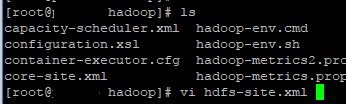
6. Configure hdfs-site.xml

#> cd /usr/local/hadoop-2.8.1/etc/hadoop
#> vi hdfs-site.xml


7. Create SSH key

#> ssh-keygen -t rsa
#> cp ~/.ssh/id_rsa.pub ~/.ssh/authorized_keys


8. Test SSH

#> ssh localhost


9. Format NameNode

#> hadoop namenode -format


10. Startup Hadoop

#> start-all.sh


11. Connect on Web browser

http://hadoophost:50070

Monday, 14 August 2017

[ActiveMQ] Authentication for JMX Connector

Apache ActiveMQ JMX connector는 2 가지 Authentication 메카니즘을 제공한다.

1. Simple authentication 
- 로그인 유저/패스워드 설정파일인 jmx.password, 유저별 권한설정 파일인 jmx.access 를 통해 접근을 제어한다.

2. JAAS authentication
- JAAS(Java Authentication and Authorization Service) realm과 로그인 모듈을 이용하여 접근을 제어한다.


Simple authentication(jmx.password, jmx.access)를 이용한 ActiveMQ JMX Connector 설정 방법

1. jmx.password 설정

$> vi $ACTIVEMQ_BASE/conf/jmx.password

# The "admin" user has password "activemq".
admin activemq
user1 password
user2 password
...
와 같이 설정한다.


2. jmx.access 설정

$> vi $ACTIVEMQ_BASE/conf/jmx.access

* 권한 종류
readonly : MBean attributes를 read만 가능
readwrite : MBean attributes Read/Write 권한 및 Invoke operation을 호출, MBean 생성/삭제 등의 권한

# The "admin" user has readwrite access.
admin readwrite
user1 readwrite
user2 readonly
...
와 같이 설정한다.

3. conf/activemq.xml 설정


<beans ... >
  <broker xmlns="http://activemq.apache.org/schema/core" ... >
    ...
    <managementContext>
      <managementContext createConnector="true"
                         connectorPort="2011"
                         jmxDomainName="org.apache.activemq">
        <property xmlns="http://www.springframework.org/schema/beans" name="environment">
          <map xmlns="http://www.springframework.org/schema/beans">
            <entry xmlns="http://www.springframework.org/schema/beans"
                   key="jmx.remote.x.password.file"
                   value="${activemq.base}/conf/jmx.password"/>
            <entry xmlns="http://www.springframework.org/schema/beans"
                   key="jmx.remote.x.access.file"
                   value="${activemq.base}/conf/jmx.access"/>
          </map>
        </property>
      </managementContext>
    </managementContext>
    ...
  </broker>
  ...
</beans>


4. Connect using (j)VisualVM


* reference
https://access.redhat.com/documentation/en-US/Fuse_ESB/4.4.1/html/ActiveMQ_Security_Guide/files/JMX-AmqConnector-Authent.html
http://activemq.apache.org/jmx.html

Wednesday, 12 April 2017

[ActiveMQ] Can't connect JMX server because of firewall

Add this JVM option

-Dcom.sun.management.jmxremote
-Dcom.sun.management.jmxremote.port=[jmx port]
-Dcom.sun.management.jmxremote.local.only=false
-Dcom.sun.management.jmxremote.authenticate=false
-Dcom.sun.management.jmxremote.ssl=false
-Djava.rmi.server.hostname=

[ActiveMQ] Mirrored Queue

<broker xmlns="http://activemq.apache.org/schema/core" brokerName="BTCBroker" useJmx="true">
    
         <destinationInterceptors>
        <virtualDestinationInterceptor>
          <virtualDestinations>
                <compositeQueue name="MY.QUEUE">
                      <forwardTo>
                            <queue physicalName="FOO" />
                            <topic physicalName="BAR" />
                      </forwardTo>
                </compositeQueue>
          </virtualDestinations>
        </virtualDestinationInterceptor>
         </destinationInterceptors>
.
.
.
</broker>

Sunday, 16 October 2016

[ActiveMQ] Force IPv4 stack

As a default, on the Linux platform, if you have IPV6 support enabled in your kernel, the Java Runtime (since 1.4 version) will use IPV6 sockets to communicate.

for forcing IPV4 stack to be used by the Java Runtime.
 -Djava.net.preferIPv4Stack=true


Friday, 22 July 2016

[ActiveMQ] Broker configuration and Client Sample using ScheduledMessage (스케줄링 메시지를 위한 브로커 설정 및 클라이언트 샘플)

ActiveMQ from version 5.4 has an optional persistent scheduler built into the ActiveMQ message broker. It is enabled by setting the broker schedulerSupport attribute to true in the Xml Configuration.

<broker xmlns="http://activemq.apache.org/schema/core" brokerName="DorbaeBroker" useJmx="true" schedulerSupport="true">

.
.
.

</broker>


Schedule Properties 

Property nameTypeDescription
AMQ_SCHEDULED_DELAYlongThe time in milliseconds that a message will wait before being scheduled to be delivered by the broker
AMQ_SCHEDULED_PERIODlongThe time in milliseconds to wait after the start time to wait before scheduling the message again
AMQ_SCHEDULED_REPEATintIf set period, the number of times to repeat scheduling a message for delivery.
Total message count = 1 + repeat

If set cron, the number of message repeat when execute cron 
AMQ_SCHEDULED_CRONStringUse a Cron entry to set the schedule

※ Be careful
If set AMQ_SCHEDULED_PERIOD, AMQ_SCHEDULED_REPEAT is the number of times to repeat scheduling a message for delivery.
(Total message count = 1 + repeat)

If set AMQ_SCHEDULED_CRON, AMQ_SCHEDULED_REPEAT is the number of times to repeat send message per 1 execution.
For example, you set
AMQ_SCHEDULED_REPEAT = 5
AMQ_SCHEDULED_CRON = * * * * *

6(1+5) messages are sent in destination per minute.


Client Sample

  1
  2
  3
  4
  5
  6
  7
  8
  9
 10
 11
 12
 13
 14
 15
 16
 17
 18
 19
 20
 21
 22
 23
 24
 25
 26
 27
 28
 29
 30
 31
 32
 33
 34
 35
 36
 37
 38
 39
 40
 41
 42
 43
 44
 45
 46
 47
 48
 49
 50
 51
 52
 53
 54
 55
 56
 57
 58
 59
 60
 61
 62
 63
 64
 65
 66
 67
 68
 69
 70
 71
 72
 73
 74
 75
 76
 77
 78
 79
 80
 81
 82
 83
 84
 85
 86
 87
 88
 89
 90
 91
 92
 93
 94
 95
 96
 97
 98
 99
100
101
102
package pe.dorbae.test.jms.activemq;

import java.util.Properties;

/*
 * ************************************************************************************
 *
 * ScheduledMessage.java
 * 
 * ************************************************************************************
 * 
 * @version 1.0.00 2016-07-22 dorbae Initialize
 * @since 2016-07-22
 * @author dorbae
 * 
 * ************************************************************************************
 */
public class TestScheduledMessage {

 public TestScheduledMessage() {
  // TODO Auto-generated constructor stub
 }

 public static void main(String[] args) {
  String jmsFactory = "org.apache.activemq.jndi.ActiveMQInitialContextFactory";
  String connectionFactoryName = "ConnectionFactory";
  String jmsUrl = "tcp://localhost:61616";
  String clientId= "iSharkClient.Test.ScheduledMessage";
  String queueName = "DORBAE.TEST";

  Properties jmsProps = new Properties();
  jmsProps.put( javax.naming.Context.INITIAL_CONTEXT_FACTORY, jmsFactory); 
  jmsProps.put( javax.naming.Context.PROVIDER_URL, jmsUrl);
  
  javax.naming.InitialContext jndi = null;
  javax.jms.ConnectionFactory connectionFactory = null;
  javax.jms.Connection conn = null;
  javax.jms.Session session = null;
  javax.jms.Destination destination = null;
  javax.jms.Message message = null;
  javax.jms.MessageProducer producer = null;
  
  try {
   jndi = new javax.naming.InitialContext( jmsProps);
   connectionFactory = ( javax.jms.ConnectionFactory)jndi.lookup( connectionFactoryName);
   conn = connectionFactory.createConnection();
   conn.setClientID( clientId);
   session = conn.createSession( false, javax.jms.Session.AUTO_ACKNOWLEDGE); // Not Transacted
   destination = session.createQueue( queueName);
   producer = session.createProducer( destination);
   message = session.createTextMessage( "http://dorbae.blogspot.com");
   
   /*
    * For Delay Message
    * 
    * Message will be sent to destination after delay times
    *  
    * 
   long delayTime = 60L * 1000L; // 1 Minute
   message.setLongProperty( org.apache.activemq.ScheduledMessage.AMQ_SCHEDULED_DELAY, delayTime);
    *
    */
   
   /*
    * For Period Repeat
    * 
    * Repeated messages will be sent to destination waiting period times between each re-delivery 
    * 
   long period = 10L * 1000L;
   int repeat = 5;
   message.setLongProperty( org.apache.activemq.ScheduledMessage.AMQ_SCHEDULED_PERIOD, period);
   message.setIntProperty( org.apache.activemq.ScheduledMessage.AMQ_SCHEDULED_REPEAT, repeat);
    *
    */
   
   /*
    * For Cron
    * 
    * Message will be sent to destination according as cron pattern 
    *
    */
   message.setStringProperty( org.apache.activemq.ScheduledMessage.AMQ_SCHEDULED_CRON, "0 * * * *");
   
   producer.send( message);
   
  } catch ( Exception e) {
   e.printStackTrace();
   
  } finally {
   if ( session != null)
    try {
     session.close();
    } catch ( Exception e) {}
   
   if ( conn != null)
    try {
     conn.close();
    } catch ( Exception e) {}
  }
 }

}

ScheduledMessage.AMQ_SCHEDULED_CRONAMQ_SCHEDULED_CRON
ScheduledMessage.AMQ_SCHEDULED_DELAYAMQ_SCHEDULED_DELAY
ScheduledMessage.AMQ_SCHEDULED_IDscheduledJobId
ScheduledMessage.AMQ_SCHEDULED_PERIODAMQ_SCHEDULED_PERIOD
ScheduledMessage.AMQ_SCHEDULED_REPEATAMQ_SCHEDULED_REPEAT
ScheduledMessage.AMQ_SCHEDULER_ACTIONAMQ_SCHEDULER_ACTION
ScheduledMessage.AMQ_SCHEDULER_ACTION_BROWSEBROWSE
ScheduledMessage.AMQ_SCHEDULER_ACTION_END_TIMEACTION_END_TIME
ScheduledMessage.AMQ_SCHEDULER_ACTION_REMOVEREMOVE
ScheduledMessage.AMQ_SCHEDULER_ACTION_REMOVEALLREMOVEALL
ScheduledMessage.AMQ_SCHEDULER_ACTION_START_TIMEACTION_START_TIME
ScheduledMessage.AMQ_SCHEDULER_MANAGEMENT_DESTINATION ActiveMQ.Scheduler.Management

※ Be careful
The message property scheduledJobId is reserved for use by the Job Scheduler. If this property is set before sending, the message will be sent immediately and not scheduled. Also, after a scheduled message is received, the property scheduledJobId will be set on the received message so keep this in mind if using something like a Camel Route which might automatically copy properties over when re-sending a message.


A Scheduled message is canceled only using JMX unfortunately. There's an open issue to support rescheduling.


Friday, 4 March 2016

[ActiveMQ] Message Expiration(Time to Live) Confusion

I set message expiration time as 10000(milliseconds). and put message into 'TEST.QUEUE ' queue. It expected that the enqueue count is going up and expired after 10 seconds. Unexpectedly, but not only enqueue count is not going up but also an exception is not occur. This phenomenon can occur when ESB(ActiveMQ) Server system time is different with client system time.


JMSTimestamp is set by client. And JMSExpiration is set as JMSTimestamp + time to live time. But, ActiveMQ expire message based on server system time. For example, if Client system time is '2016-03-04 11:00:00' and server system time is '2016-03-04 11:00:00' and time to live of message is 1 minute, the message is expired after 30 seconds.


Therefore, if ActiveMQ server system time is faster than client system time and a time to live of message is smaller than difference between server system time and client system time, the message is expired before entering a queue.