java -jar h2*.jar -webAllowOthers -tcpAllowOthers
Wednesday, 3 August 2016

Friday, 29 July 2016
[Eclipse] Favorite Plugins Software Sites
GEF releases
http://download.eclipse.org/tools/gef/updates/releases
Subversive
http://download.eclipse.org/technology/subversive/2.0/update-site
ER-Master
http://ermaster.sourceforge.net/update-site
Properties Editor
http://propedit.sourceforge.jp/eclipse/updates
PyDev
http://pydev.org/updates
Eclipse Color Theme
http://eclipse-color-theme.github.io/update/
Eclipse Class Decompiler
http://opensource.cpupk.com/decompiler/update/
More Clipboard
http://moreclipboard.sourceforge.net/updates/
Nebual Project (SWT Widget)
http://download.eclipse.org/nebula/snapshot/
Window Builder
Mars - http://download.eclipse.org/windowbuilder/WB/release/R201506241200-1/4.5/
Luna - http://download.eclipse.org/windowbuilder/WB/release/R201506241200-1/4.4/
Kepler - http://download.eclipse.org/windowbuilder/WB/release/R201406251200/4.3/
Properties Editor
http://propedit.sourceforge.jp/eclipse/updates
PyDev
http://pydev.org/updates
Eclipse Color Theme
http://eclipse-color-theme.github.io/update/
Eclipse Class Decompiler
http://opensource.cpupk.com/decompiler/update/
More Clipboard
http://moreclipboard.sourceforge.net/updates/
Nebual Project (SWT Widget)
http://download.eclipse.org/nebula/snapshot/
Window Builder
Mars - http://download.eclipse.org/windowbuilder/WB/release/R201506241200-1/4.5/
Luna - http://download.eclipse.org/windowbuilder/WB/release/R201506241200-1/4.4/
Kepler - http://download.eclipse.org/windowbuilder/WB/release/R201406251200/4.3/
Monday, 25 July 2016
[CentOS] How to set up NTP client (NTP 클라이언트 설정)
NTP(Network Time Protocol)
NTP is network time protocol for maintaining correct system time. It can adjust the time according to a radio or atomic clock and can be tailored to the millisecond time (1/1000 second).Basically, NTP has a hierarchical structure of stratum.
straum 0 : Equipment for calculating the time. Ex) GPS, CS(cesium) Atomic Clock
straum 1 : Server synchronizing the time from straum 1.
straum 2 ~ n : Time server.
Setup
1. Install packages
1 | #> yum -y install ntp
|

2. Edit configuration file
#> vi /etc/ntp.conf

3. Register NTP service
#> chkconfig ntpd on
#> chkconfig --list | grep ntpd

4. Start NTP service
#> service ntpd start

Friday, 22 July 2016
[ActiveMQ] Broker configuration and Client Sample using ScheduledMessage (스케줄링 메시지를 위한 브로커 설정 및 클라이언트 샘플)
ActiveMQ from version 5.4 has an optional persistent scheduler built into the ActiveMQ message broker. It is enabled by setting the broker schedulerSupport attribute to true in the Xml Configuration.
※ Be careful
If set AMQ_SCHEDULED_PERIOD, AMQ_SCHEDULED_REPEAT is the number of times to repeat scheduling a message for delivery.
(Total message count = 1 + repeat)
If set AMQ_SCHEDULED_CRON, AMQ_SCHEDULED_REPEAT is the number of times to repeat send message per 1 execution.
For example, you set
AMQ_SCHEDULED_REPEAT = 5
AMQ_SCHEDULED_CRON = * * * * *
6(1+5) messages are sent in destination per minute.
※ Be careful
The message property scheduledJobId is reserved for use by the Job Scheduler. If this property is set before sending, the message will be sent immediately and not scheduled. Also, after a scheduled message is received, the property scheduledJobId will be set on the received message so keep this in mind if using something like a Camel Route which might automatically copy properties over when re-sending a message.

A Scheduled message is canceled only using JMX unfortunately. There's an open issue to support rescheduling.


<broker xmlns="http://activemq.apache.org/schema/core" brokerName="DorbaeBroker" useJmx="true" schedulerSupport="true">

.
.
.

</broker>
Schedule Properties
| Property name | Type | Description |
| AMQ_SCHEDULED_DELAY | long | The time in milliseconds that a message will wait before being scheduled to be delivered by the broker |
| AMQ_SCHEDULED_PERIOD | long | The time in milliseconds to wait after the start time to wait before scheduling the message again |
| AMQ_SCHEDULED_REPEAT | int | If set period, the number of times to repeat scheduling a message for delivery. Total message count = 1 + repeat If set cron, the number of message repeat when execute cron |
| AMQ_SCHEDULED_CRON | String | Use a Cron entry to set the schedule |
※ Be careful
If set AMQ_SCHEDULED_PERIOD, AMQ_SCHEDULED_REPEAT is the number of times to repeat scheduling a message for delivery.
(Total message count = 1 + repeat)
If set AMQ_SCHEDULED_CRON, AMQ_SCHEDULED_REPEAT is the number of times to repeat send message per 1 execution.
For example, you set
AMQ_SCHEDULED_REPEAT = 5
AMQ_SCHEDULED_CRON = * * * * *
6(1+5) messages are sent in destination per minute.
Client Sample
1 2 3 4 5 6 7 8 9 10 11 12 13 14 15 16 17 18 19 20 21 22 23 24 25 26 27 28 29 30 31 32 33 34 35 36 37 38 39 40 41 42 43 44 45 46 47 48 49 50 51 52 53 54 55 56 57 58 59 60 61 62 63 64 65 66 67 68 69 70 71 72 73 74 75 76 77 78 79 80 81 82 83 84 85 86 87 88 89 90 91 92 93 94 95 96 97 98 99 100 101 102 | package pe.dorbae.test.jms.activemq; import java.util.Properties; /* * ************************************************************************************ * * ScheduledMessage.java * * ************************************************************************************ * * @version 1.0.00 2016-07-22 dorbae Initialize * @since 2016-07-22 * @author dorbae * * ************************************************************************************ */ public class TestScheduledMessage { public TestScheduledMessage() { // TODO Auto-generated constructor stub } public static void main(String[] args) { String jmsFactory = "org.apache.activemq.jndi.ActiveMQInitialContextFactory"; String connectionFactoryName = "ConnectionFactory"; String jmsUrl = "tcp://localhost:61616"; String clientId= "iSharkClient.Test.ScheduledMessage"; String queueName = "DORBAE.TEST"; Properties jmsProps = new Properties(); jmsProps.put( javax.naming.Context.INITIAL_CONTEXT_FACTORY, jmsFactory); jmsProps.put( javax.naming.Context.PROVIDER_URL, jmsUrl); javax.naming.InitialContext jndi = null; javax.jms.ConnectionFactory connectionFactory = null; javax.jms.Connection conn = null; javax.jms.Session session = null; javax.jms.Destination destination = null; javax.jms.Message message = null; javax.jms.MessageProducer producer = null; try { jndi = new javax.naming.InitialContext( jmsProps); connectionFactory = ( javax.jms.ConnectionFactory)jndi.lookup( connectionFactoryName); conn = connectionFactory.createConnection(); conn.setClientID( clientId); session = conn.createSession( false, javax.jms.Session.AUTO_ACKNOWLEDGE); // Not Transacted destination = session.createQueue( queueName); producer = session.createProducer( destination); message = session.createTextMessage( "http://dorbae.blogspot.com"); /* * For Delay Message * * Message will be sent to destination after delay times * * long delayTime = 60L * 1000L; // 1 Minute message.setLongProperty( org.apache.activemq.ScheduledMessage.AMQ_SCHEDULED_DELAY, delayTime); * */ /* * For Period Repeat * * Repeated messages will be sent to destination waiting period times between each re-delivery * long period = 10L * 1000L; int repeat = 5; message.setLongProperty( org.apache.activemq.ScheduledMessage.AMQ_SCHEDULED_PERIOD, period); message.setIntProperty( org.apache.activemq.ScheduledMessage.AMQ_SCHEDULED_REPEAT, repeat); * */ /* * For Cron * * Message will be sent to destination according as cron pattern * */ message.setStringProperty( org.apache.activemq.ScheduledMessage.AMQ_SCHEDULED_CRON, "0 * * * *"); producer.send( message); } catch ( Exception e) { e.printStackTrace(); } finally { if ( session != null) try { session.close(); } catch ( Exception e) {} if ( conn != null) try { conn.close(); } catch ( Exception e) {} } } } |
| ScheduledMessage.AMQ_SCHEDULED_CRON | AMQ_SCHEDULED_CRON |
| ScheduledMessage.AMQ_SCHEDULED_DELAY | AMQ_SCHEDULED_DELAY |
| ScheduledMessage.AMQ_SCHEDULED_ID | scheduledJobId |
| ScheduledMessage.AMQ_SCHEDULED_PERIOD | AMQ_SCHEDULED_PERIOD |
| ScheduledMessage.AMQ_SCHEDULED_REPEAT | AMQ_SCHEDULED_REPEAT |
| ScheduledMessage.AMQ_SCHEDULER_ACTION | AMQ_SCHEDULER_ACTION |
| ScheduledMessage.AMQ_SCHEDULER_ACTION_BROWSE | BROWSE |
| ScheduledMessage.AMQ_SCHEDULER_ACTION_END_TIME | ACTION_END_TIME |
| ScheduledMessage.AMQ_SCHEDULER_ACTION_REMOVE | REMOVE |
| ScheduledMessage.AMQ_SCHEDULER_ACTION_REMOVEALL | REMOVEALL |
| ScheduledMessage.AMQ_SCHEDULER_ACTION_START_TIME | ACTION_START_TIME |
| ScheduledMessage.AMQ_SCHEDULER_MANAGEMENT_DESTINATION | ActiveMQ.Scheduler.Management |
※ Be careful
The message property scheduledJobId is reserved for use by the Job Scheduler. If this property is set before sending, the message will be sent immediately and not scheduled. Also, after a scheduled message is received, the property scheduledJobId will be set on the received message so keep this in mind if using something like a Camel Route which might automatically copy properties over when re-sending a message.

A Scheduled message is canceled only using JMX unfortunately. There's an open issue to support rescheduling.


Tuesday, 12 July 2016
[JDBC] java.lang.ClassNotFoundException: sun.jdbc.odbc.JdbcOdbcDriver Exception occuring
JDBC-ODBC Bridge has been removed since Java 8. If you want to use JDBC-ODBC driver, you should run on below Java 7. If had been used JDBC-ODBC driver for interfacing with Microsoft Access database, you can use 'UCanAccess' library that is open-source pure java JDBC driver.
http://ucanaccess.sourceforge.net/site.html
http://ucanaccess.sourceforge.net/site.html
Monday, 4 July 2016
[Maria/MySQL] How to allow remote client access database (원격 접속 허용 설정)
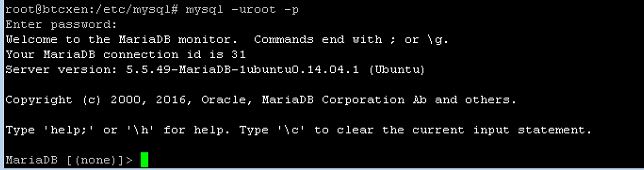
1. Connect database as root
#> mysql -uroot -p
2. Check current status
SELECT host FROM mysql.user WHERE user='[USER_NAME]';

3. Add remote authority
INSERT INTO mysql.user (host,user,password) VALUES ('[Allowed IP]', '[USER_NAME]', password('[PASSWORD]'));
GRANT ALL PRIVILEGES ON *.* TO '[USER_NAME]'@'[Allowed IP]';
FLUSH PRIVILEGES;

[Ubuntu] How to change hostname
hostnamectl [OPTIONS...] COMMAND ...
Query or change system hostname.
-h --help Show this help
--version Show package version
--transient Only set transient hostname
--static Only set static hostname
--pretty Only set pretty hostname
--no-ask-password Do not prompt for password
-H --host=[USER@]HOST Operate on remote host
Commands:
status Show current hostname settings
set-hostname NAME Set system hostname
set-icon-name NAME Set icon name for host
set-chassis NAME Set chassis type for host
#> hostnamectl set-hostname [HOSTNAME]
[Ubuntu] Install and Setup NFS Client (NFS 클라이언트 설치 및 설정하기)
1. Install package
#> apt-get install nfs-common

2. Mount directory
#> mount -t nfs [NFS_SERVER_HOST]:[REMOTE_DIRECTORY] [LOCAL_DIRECTORY]

3. Register /etc/fstab
#> vi /etc/fstab
| [NFS_SERVER_HOST]:[REMOTE_DIRECTORY] | [LOCAL_DIRECTORY] | nfs | [OPTIONS] |

[Ubuntu] Install and Setup NFS Server (NFS서버 설치 및 설정하기)
1. Install packages for NFS server
#> apt-get install nfs-common nfs-kerne-server rpcbind

2. Make directory for sharing
#> mkdir [DIRECTORY]

3. Setup directory and authority
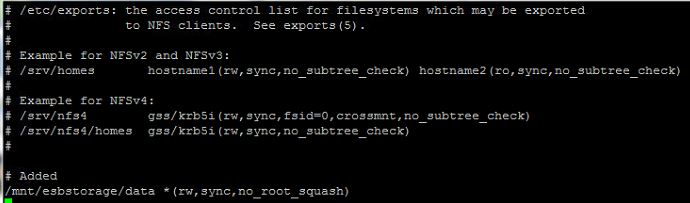
#> vi /etc/exports
| Directory | Allowed IP(Options) |
Options
| ro | read only |
| rw | read/write |
| root_squash | Prevents root users connected remotely from having root privileges and assigns them the user ID for the user nfsnobody |
| no_root_squash | Turns off root squashing |
| async | Allows the server to write data at non-regular intervals. This setting works best if the exported file system is read-only |
| sync | All file writes are committed to the disk before the write request by the client is completed |
| wdelay | Improve performance by reducing the number of times the disk must be accessed by separate write commands, reducing write overhead |
| no_wdelay | Turns off this feature, but is only available when using the sync option. |

4. Restart NFS Server
#> nfs-kernel-server restart

5. Restart rpcbind
#> rpcbind restart

[Linux] How to get processes id using named files, sockets, or filesystems (Named 파일, 파일시스템, 소켓을 사용중인 프로세스 ID 찾기)
Usage: fuser [ -a | -s | -c ] [ -n SPACE ] [ -SIGNAL ] [ -kimuv ] NAME...
[ - ] [ -n SPACE ] [ -SIGNAL ] [ -kimuv ] NAME...
fuser -l
fuser -V
Show which processes use the named files, sockets, or filesystems.
-a display unused files too
-c mounted FS
-f silently ignored (for POSIX compatibility)
-i ask before killing (ignored without -k)
-k kill processes accessing the named file
-l list available signal names
-m show all processes using the named filesystems
-n SPACE search in this name space (file, udp, or tcp)
-s silent operation
-SIGNAL send this signal instead of SIGKILL
-u display user IDs
-v verbose output
-V display version information
-4 search IPv4 sockets only
-6 search IPv6 sockets only
- reset options
udp/tcp names: [local_port][,[rmt_host][,[rmt_port]]]

[ - ] [ -n SPACE ] [ -SIGNAL ] [ -kimuv ] NAME...
fuser -l
fuser -V
Show which processes use the named files, sockets, or filesystems.
-a display unused files too
-c mounted FS
-f silently ignored (for POSIX compatibility)
-i ask before killing (ignored without -k)
-k kill processes accessing the named file
-l list available signal names
-m show all processes using the named filesystems
-n SPACE search in this name space (file, udp, or tcp)
-s silent operation
-SIGNAL send this signal instead of SIGKILL
-u display user IDs
-v verbose output
-V display version information
-4 search IPv4 sockets only
-6 search IPv6 sockets only
- reset options
udp/tcp names: [local_port][,[rmt_host][,[rmt_port]]]

[Linux] How to get process id using specific TCP/UDP port (특정 TCP/UDP 포트를 사용중인 프로세스 ID 찾기)
#> netstat -nap | grep [PORT]

Wednesday, 29 June 2016
[Ubuntu] Setup firewall using UFW
UFW is a default firewall. it is more easier than iptables. But iptables supports more various options and functions for building high-quality service.


1. Set UFW Enable/Disable
#> ufw enable
#> ufw disable
2. Check UFW status
#> ufw status verbose

3. Check default rule
#> ufw show raw

4. Allow/Deny default rule
#> ufw default allow
#> ufw default deny
5. Allow/Deny specific port and protocol
#> ufw allow [port]
#> ufw allow [port]/tcp
#> ufw allow [port]/udp
#> ufw deny[port]
#> ufw deny[port]/tcp
#> ufw deny[port]/udp
[Ubuntu] How to turn off coloring syntax in vi editor
#> vi /etc/vim/vimrc

remove if has("syntax") syntax on end if.

Subscribe to:
Posts (Atom)